 Documentation
Signing and Sending Transactions
WalletConnect can be used to send transactions to OP_NET smart contracts. The following section covers the required steps.
Get Required Parameters
Ensure the following parameters are available before sending a transaction:
- address: The user's public key as an Address object, used to sign the transaction.
- walletAddress: The wallet address that receives any transaction refunds.
- network: The network on which the transaction will be executed.
- provider: The provider used to broadcast the transaction to the network.
import { useWallet } from "@btc-vision/walletconnect";

const { address, walletAddress, network, provider } = useWalletConnect();
Get the Contract Instance
Use the getContract() method to create a typed contract instance. This instance exposes methods for encoding calldata for contract function calls.
const contractAddress = "opr1exampleaddress"; // Replace with a valid contract address

const contractInstance = getContract<IOP_20Contract>(
    contractAddress,  // Contract address
    OP_20_ABI,        // Contract ABI
    provider,         // Provider instance
    network,          // Target network
    address: address  // Sender's publicKey (in Address object)
);Simulate the Transaction
Run a simulation before submitting the transaction to ensure it will execute successfully. This helps avoid failures caused by incorrect parameters or insufficient funds.
const mintApprove = await contractInstance.mint(account.address, 100n);
if (!mintApprove) {
    throw new Error("Mint call failed.");
}Send the Transaction
Use the sendTransaction() method to sign and send the transaction.
const tx = await mintApprove.sendTransaction({
    signer: null,               // OP_WALLET do not need a signer
    maximumAllowedSatToSpend: 100_000n,
    network: network,           // The network on which to do the transaction
    refundTo: walletAddress,    // Wallet Account Address, NOT the publiKey
});
if (!tx.transactionId) {
    throw new Error("Failed to send transaction");
}

console.log("Transaction:", tx);Full Example
import './App.css'

import {getContract, type IOP20Contract, OP_20_ABI} from "opnet";
import {useWalletConnect} from "@btc-vision/walletconnect";

function App() {
    const {
        connectToWallet, disconnect,
        walletAddress, address,
        network, provider
    } = useWalletConnect()

    async function mintSomeToken() {
        if (!address || !walletAddress || !provider || !network){
            throw new Error("Connect wallet first");
        }

        // This is the contract address for PILL minting
        const contractAddress = "opt1sqpvdcn3ae06nnwuwxjcs99s03j63l4949qpldwtx";

        const contractInstance = getContract<IOP20Contract>(
            contractAddress, // Contract address
            OP_20_ABI,       // Contract ABI
            provider,        // Provider instance (AbstractRPCProvider)
            network,         // Target network
            address          // Sender's publicKey (publicKey in Address object)
        );

        const mintApprove = await contractInstance.mint(address, 100n);
        if (!mintApprove) {
            throw new Error("Mint call failed.");
        }

        const tx = await mintApprove.sendTransaction({
            signer: null,               // OP_WALLET do not need a signer
            maximumAllowedSatToSpend: 100_000n,
            network: network,
            refundTo: walletAddress,    // Wallet Account Address
        });

        if (!tx.transactionId) {
            throw new Error("Failed to send transaction");
        }

        console.log("Transaction:", tx);
    }

    return (
        <div>
            <p>Connected Address: {walletAddress}</p>
            <button onClick={async () => { await connectToWallet('OP_WALLET')}}>Connect</button>
            <button onClick={async () => { await mintSomeToken()}}>Approve a random token</button>
            <button onClick={async () => { await disconnect()}>Disconnect</button>
        </div>
    );
}

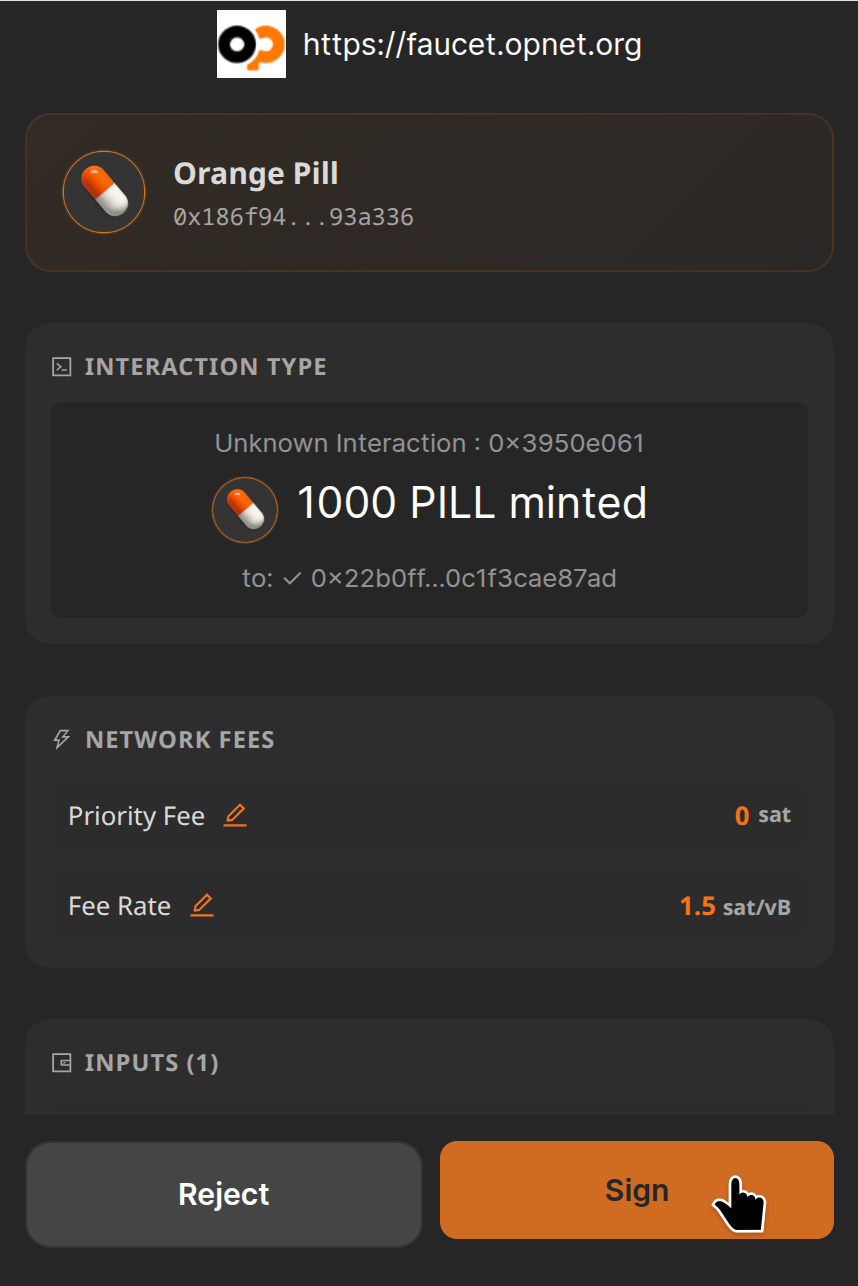
export default AppThe wallet displays a confirmation dialog prompting the user to approve and sign the transaction.
The screenshot below shows the OP_WALLET signing dialog:
Best Practices
- Simulate transactions before broadcasting to ensure successful execution.
- Set a spending limit using the maximumAllowedSatToSpend parameter.
- Monitor transaction status after submission to confirm success or detect failures.
- Implement robust error handling for a smooth user experience.
- Verify the contract address and ABI before initiating any transaction.
Monitoring Transaction
Monitor transaction status using one of the following block explorers: